

Check your balance and usage
Two places show your balance and usage. Both read the same data.
Two entry points
Section titled “Two entry points”- Home page → the usage card — use this day to day. The Usage Statistics link at the top right of the card jumps to the full page.
- Analytics → the Usage Statistics tab — the full version. The usage block sits above, with consumption and top-up records below.
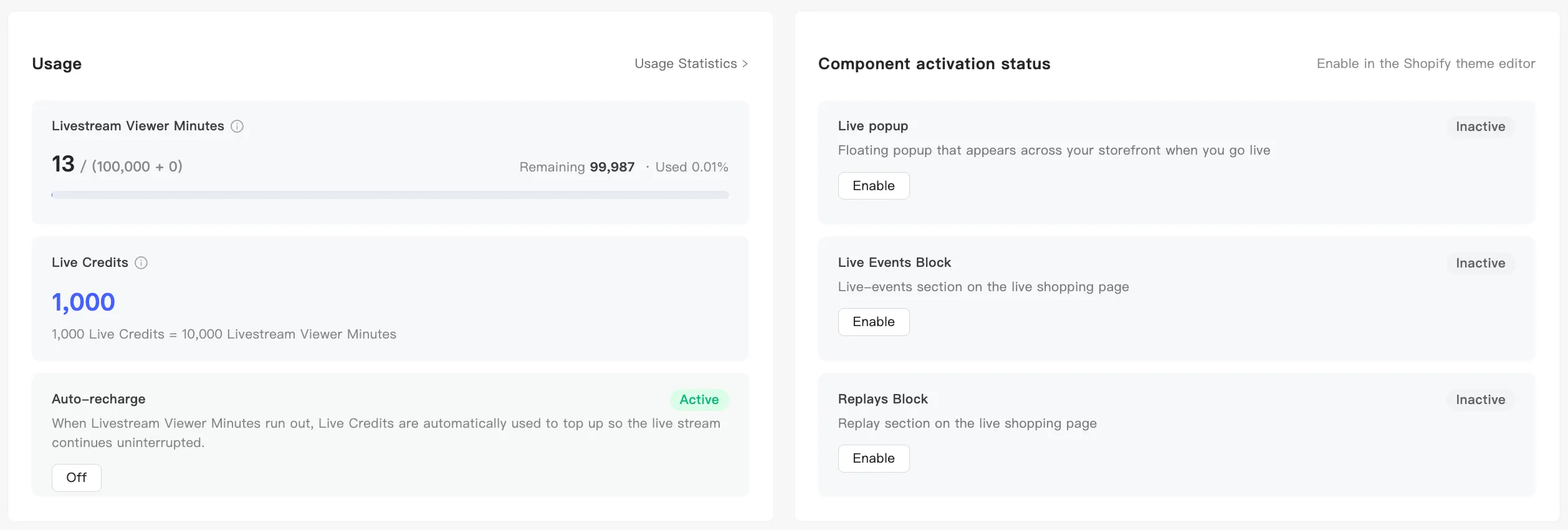
What the usage block holds
Section titled “What the usage block holds”Both places show the same three blocks side by side:
Livestream Viewer Minutes — the headline figure is used / (plan allowance + add-on allowance), with Remaining and Used beside it and a progress bar below. The bar changes color: yellow at 80%, red at 95%.
Live Credits — your current balance, with the conversion rate below it.
Auto-recharge — Active or Inactive at the top right, with a button below to switch it. Both pages drive the same switch, so either one works. See Auto-recharge.
The Usage Statistics page adds one line the home card does not: Current subscription with the plan name, an Active marker, the billing period, and Expiration Date.
For what the two balances are and how they convert, see Viewer minutes and Live Credits.